Docryva turns Android phones into private document scanners
Docryva, developed by Ronald-Derksen, turns an Android device into a portable document scanner for everyday paperwork. The app captures pages, combines multi-page captures, and prepares exportable PDFs with quick image cleanup. It highlights automatic framing, on-device storage, and a system share integration for distribution. Designed for students, professionals, and home users, it prioritizes privacy and fast, offline document capture without mandatory accounts.
What the app is and the workflows it supports
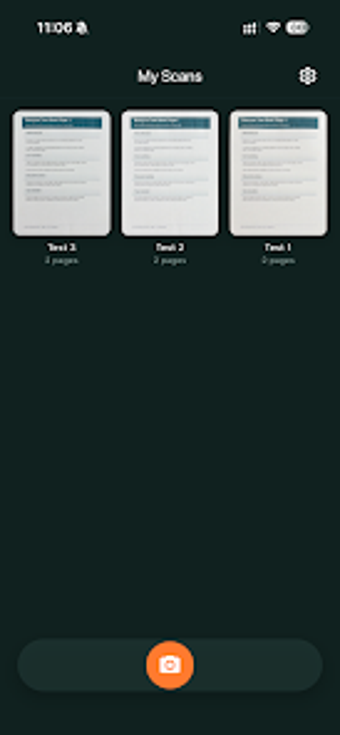
Docryva operates as a dedicated mobile scanner that targets fast document digitization for routine business tasks such as receipts, invoices, and signed forms. In practical use it converts photographed pages into professional-looking documents, then offers a simple path from capture to final PDF for filing or sending. The workflow fits short capture sessions where speed and local control are primary concerns.
How multi-page capture and document output are organised
The tool combines successive scans into a single document and exports that file as a PDF through the device's share sheet. Multi-page assembly and page reordering live inside the document view, and export sends the final PDF to email or other apps. This design supports creating consolidated reports or expense bundles without intermediate conversion steps.
How the interface and onboarding affect daily use
The interface adopts a clean, distraction-free layout that guides users through framing and cleanup without account setup. Built-in presets apply image cleanup automatically, and the camera view assists with automatic edge detection during capture. These choices reduce setup time for people who need straightforward scanning rather than configurable scanning workflows.
Storage model, sharing options, and practical limits
Files are stored on the device by default under a local-first model, so documents remain offline unless a user decides to share them. The app integrates with the system share sheet for distribution and is updated to support current Android builds. Users who rely on automatic cloud backup or continuous sync should note the emphasis on device-local storage.
Docryva suits privacy-minded scanners who prefer on-device control
Docryva is a practical option for students and professionals who need reliable on-device document capture and PDF output. The app prioritizes device storage and direct exports over automatic cloud sync, which is a conscious trade-off for privacy. For anyone digitizing routine paperwork and preferring local control, it performs as a focused, low-friction scanning tool.